Using the Find Function
Clicking on the Find button will allow you to look for and "Find" one certain record or a specific group of records in The People File. You may base this search on combinations of Membership criteria from any Family Record Fields or Individual Record Fields, as well as Donations criteria selected on the Giving / Pledging Selection Criteria.
The Find Grid is a very powerful tool
that you may use both to view or edit your Membership data as well as create Reports / Directory / Exports and/or Labels.
To find a certain record or group of records:
- From The Initial Portal of Church Windows choose Membership.
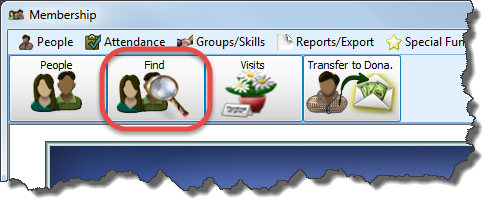
- Click Find in the Button Bar at the top of the screen
- Enter your Find Criteria into the Query Builder selections for People Selection Criteria and Giving / Pledging Selection Criteria (just like you would using Reports / Directory / Exports):
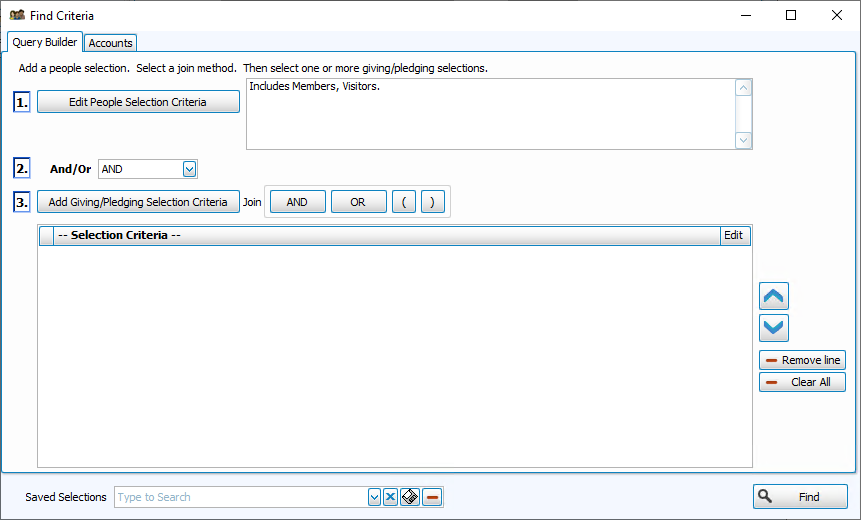
- When you have finished making your selections, click Find (If you want all Members and Visitors just click Find without making any selections).
If only one person meets the criteria of your Find, then
The Individual Record for that person will appear on the screen. If more than one person meets
your Find criteria, then these people will appear in The Find Grid window.
Note:
Once you have selected the appropriate criteria in any tab(s), you have the ability to save the all selections you have made in all the tabs by clicking on the  floppy-disc button to the right of the Saved Selections field at the bottom, at any time, no matter which tab you are in, and name it appropriately. From that point on, you can access that specific search criteria any time you go back into this screen.
